Case study
Building a policy builder for how adminstrators actually think
The Gateway firewall policy builder was a fragmented, scroll-heavy configuration experience. I led a redesign to turn it into a unified visual workflow built around real user mental models.
This work reframed policy creation around a persistent If / Then structure while using AI-assisted prototyping to rapidly accelerate alignment, iteration, and organizational momentum.
Impact
My impact
Unified fragmented workflows
Consolidated separate DNS, HTTP, and Network policy experiences into a single workflow aligned to how administrators naturally think about policy creation.
Reduced cognitive overhead
Introduced a persistent If / Then structure that kept conditions, actions, and downstream settings visible simultaneously.
Accelerated organizational momentum
Used AI-assisted prototyping to rapidly transform abstract UX concepts into interactive workflows stakeholders could immediately react to.
Improved policy validation
Added visual previews, natural-language summaries, and advanced expression views to help users better understand policy behavior before deployment.
The problem
A critical enterprise workflow had become a wall of scroll
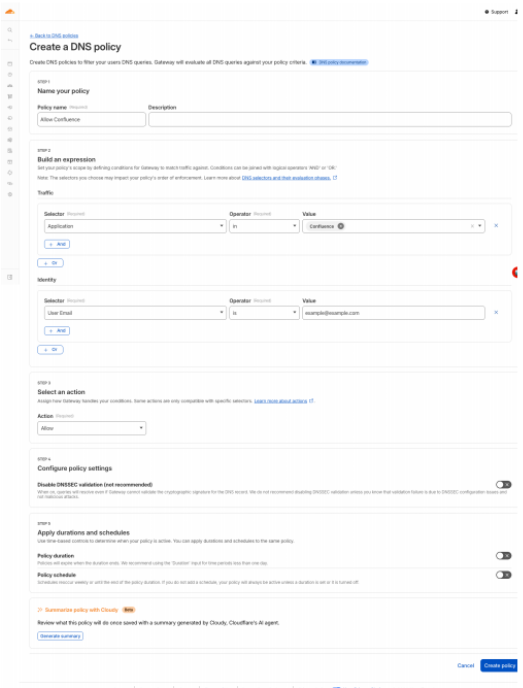
The Gateway firewall policy builder was one of the most heavily used surfaces in the Zero Trust dashboard, but over time the experience became increasingly difficult to scale. Administrators needed to configure highly conditional policies across DNS, HTTP, and Network traffic, yet the UI separated those workflows into distinct policy types despite sharing the same underlying logic.
As more controls, exceptions, and conditional settings were introduced, the experience gradually evolved into what many internally referred to as a wall of scroll: a vertically stacked workflow with excessive whitespace, limited progressive disclosure, and disconnected relationships between policy conditions and their resulting actions.
Through customer calls, feedbask sessions, and competitive analysis, a recurring pattern emerged. Users generally understood the security outcomes they wanted, but struggled to map those goals to the structure of the interface itself. Administrators were not naturally thinking in terms of traffic categories or sequential configuration flows. They were thinking: If this happens, then do this.
Redesigning such a critical enterprise workflow also carried significant organizational friction. Conversations around improving the policy builder had existed for a long time, but the sheer amount of conditionality made it difficult to communicate a radically different approach through static wireframes alone.
The challenge was not just simplifying the experience. It was creating enough momentum to make a large-scale redesign feel achievable.
The solution
A unified If / Then workflow that preserved technical flexibility
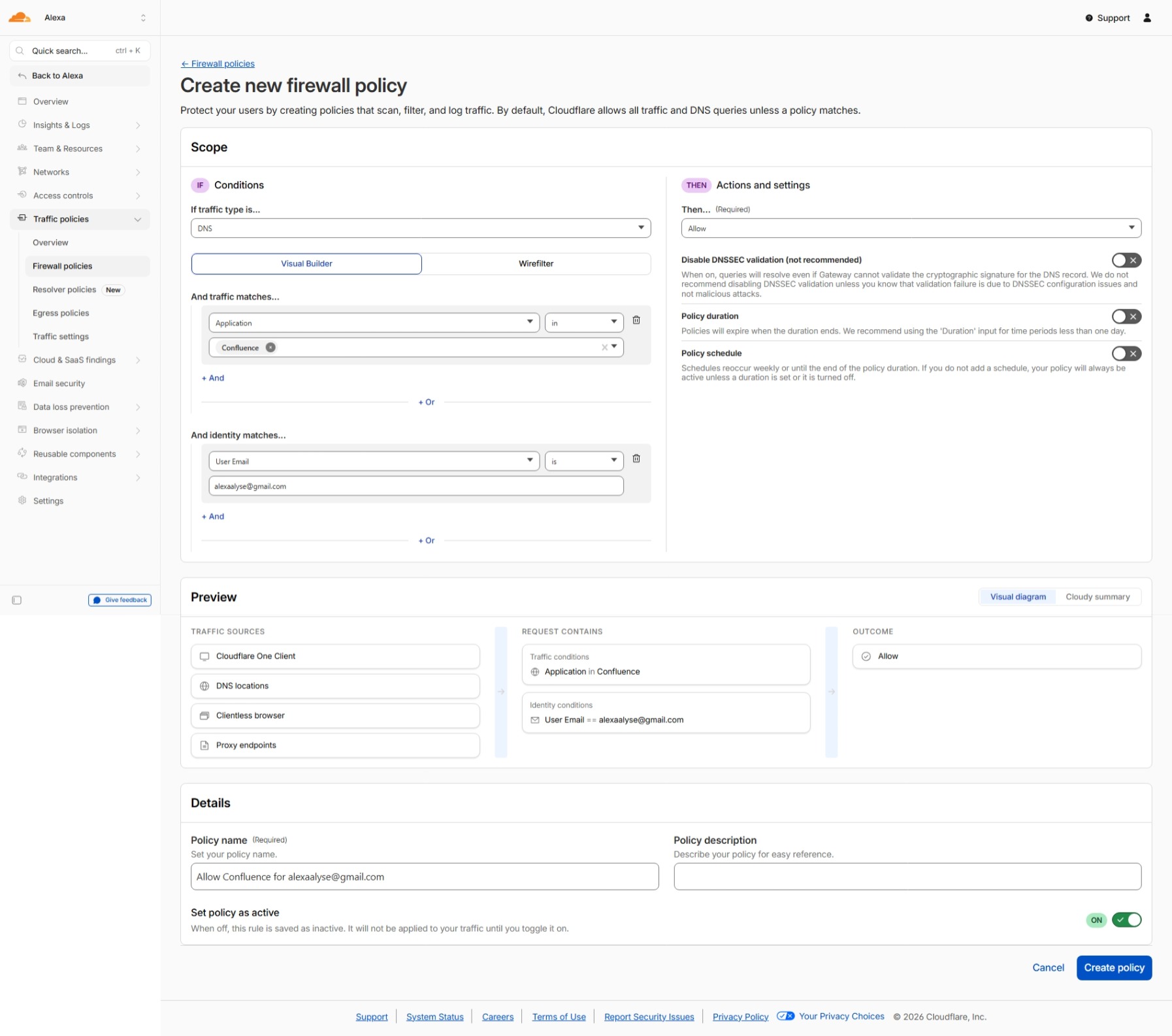
I began by reframing the builder around a much simpler mental model: outcomes instead of implementation details. Rather than separating policies into distinct DNS, HTTP, and Network builders, traffic type became another component of policy scope itself.
The redesigned experience centered around a persistent dual-column If / Then structure. Conditions and traffic scope remained visible on the left, while actions and downstream settings remained visible on the right. This preserved the relationship between policy inputs and outcomes at all times.
To further reduce visual noise, the builder introduced progressive disclosure patterns that revealed advanced settings only when relevant. Instead of forcing users to parse every possible configuration state simultaneously, the interface adapted dynamically based on the policy selections being made.
The redesign also introduced multiple ways to validate policy behavior depending on user expertise and preference: visual flow previews, natural-language summaries, and raw Wirefilter expressions for advanced users.
01
If
Keep conditions, selectors, traffic scope, and exceptions visible as the policy is built.
02
Then
Show actions and downstream settings beside the conditions they depend on.
03
Validate
Help administrators preview behavior through visual flows, summaries, and advanced expressions.
Before
After
Validation
AI-assisted prototyping turned abstract alignment into tangible momentum
One of the most important parts of this project was not just the redesign itself. It was how AI dramatically accelerated the ability to explore and communicate complex UX ideas.
Instead of relying solely on static wireframes, I used Figma Make alongside natural-language prompting and reference materials to rapidly generate interactive workflow concepts that stakeholders could immediately engage with. This moved conversations beyond abstract discussions and into tangible experiences much earlier in the process.
I also used AI-assisted analysis of internal documentation to quickly extract and categorize the large number of conditional settings and behaviors supported by Gateway policies. This made it possible to simulate realistic progressive disclosure behaviors within the prototype itself.
Although the redesigned policy builder is still early in its lifecycle, the prototype created a shared visual language for alignment discussions and compressed the path from concept to design refinement and engineering handoff.
Reflection
Enterprise complexity becomes easier to manage when interfaces reflect user intent
01
Enterprise complexity becomes easier to manage when interfaces reflect user intent
Administrators already understood the security outcomes they wanted to achieve. The friction came from needing to translate those goals into workflows shaped around implementation details, protocol categories, and fragmented configuration patterns.
02
Progressive disclosure is critical for scalable enterprise UX
The issue was not the existence of advanced functionality. It was exposing too much of it simultaneously. Contextual progressive disclosure allowed the builder to support highly conditional workflows while reducing cognitive overhead and visual noise.
03
AI is most valuable when it accelerates momentum, not just production
The biggest impact AI had on this project was reducing the friction required to explore ambitious UX changes. By rapidly prototyping conditional workflows and simulating realistic interactions, AI helped transform abstract redesign conversations into tangible experiences teams could immediately align around.